<?xml version="1.0" encoding="utf-8"?>
<feed xmlns="http://www.w3.org/2005/Atom">

  <title><![CDATA[dan.kerrigan.io]]></title>
  <link href="http://dan.kerrigan.io/atom.xml" rel="self"/>
  <link href="http://dan.kerrigan.io/"/>
  <updated>2013-12-31T17:46:04-05:00</updated>
  <id>http://dan.kerrigan.io/</id>
  <author>
    <name><![CDATA[Dan kerrigan]]></name>
    
  </author>
  <generator uri="http://octopress.org/">Octopress</generator>

  
  <entry>
    
    <title type="html"><![CDATA[Zombies]]></title>
    <link href="http://dan.kerrigan.io/zombies/"/>
    
    <updated>2013-12-31T12:53:57-05:00</updated>
    <id>http://dan.kerrigan.io/zombies</id>
    
    <content type="html"><![CDATA[<h1>The War against Zombies is still raging!</h1>

<p>In the United States, the CDC has recovered 1 million Acute Zombilepsy vicitims and has asked for our help loading the data into a Riak cluster for analysis and ground team support.</p>

<h2>Know the Zombies, Know Thyself</h2>

<p>The future of the world rests in a CSV file with the following fields:</p>

<ol>
<li>DNA</li>
<li>Gender</li>
<li>Full Name</li>
<li>StreetAddress</li>
<li>City</li>
<li>State</li>
<li>Zip Code</li>
<li>TelephoneNumber</li>
<li>Birthday</li>
<li>National ID</li>
<li>Occupation</li>
<li>BloodType</li>
<li>Pounds</li>
<li>Feet Inches</li>
<li>Latitude</li>
<li>Longitude</li>
</ol>


<p>For each record, we&rsquo;ll serialize this CSV document into JSON and use the National ID as the Key.  Our ground teams need the ability to find concentrations of recovered zombie victims using a map so we&rsquo;ll be using the Zip code as an index value for quick lookup.  Additionally, we want to enable a geospatial lookup for zombies so we&rsquo;ll also <a href="http://en.wikipedia.org/wiki/Geohash">GeoHash</a> the latitude and longitude, truncate the hash to 4 characters for approximate area lookup, and use that an index term.  We&rsquo;ll use the GSet Term-Based Inverted Indexes that we created since the dataset will be exclusively for read operations once the dataset has been loaded.  We&rsquo;ve hosted this project at <a href="http://github.com/drewkerrigan/riak-inverted-index-demo/">Github</a> so that in the event we&rsquo;re over taken by Zombies our work can continue.</p>

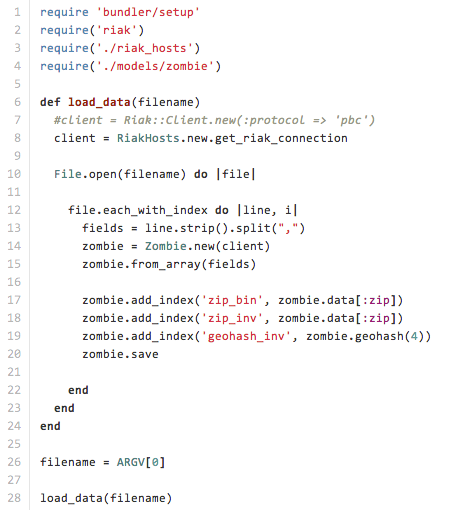
<p>In our load script, we read the text file and create new Zombies, add Indexes, then store the record:</p>

<p><img src="images/load_data.rb.png" alt="image" /></p>

<p><a href="https://github.com/drewkerrigan/riak-inverted-index-demo/blob/master/load_data.rb">load_data.rb script</a></p>

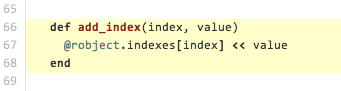
<p>Our Zombie model contains the code for serialization and adding the indexes to the object:</p>

<p><img src="images/zombie.rb_add_index.png" alt="image" /></p>

<p><a href="https://github.com/drewkerrigan/riak-inverted-index-demo/blob/master/models/zombie.rb#L66-L68">zombie.rb add index</a></p>

<p>Let&rsquo;s run some quick tests against the Riak HTTP interface to verify that zombie data exists.</p>

<p>First let&rsquo;s query for a known zombilepsy victim:</p>

<p><code>curl -v http://127.0.0.1:8098/buckets/zombies/keys/427-69-8179</code></p>

<p>Next, let&rsquo;s query the inverted index that we created.  If the index has not been merged, then a list of siblings will be displayed:</p>

<p>Zip Code for Jackson, MS:<br/>
<code>curl -v -H "Accept: multipart/mixed" http://127.0.0.1:8098/buckets/zip_inv/keys/39201</code></p>

<p>GeoHash for Washington DC:<br/>
<code>curl -v -H "Accept: multipart/mixed" http://127.0.0.1:8098/buckets/geohash_inv/keys/dqcj</code></p>

<p>Excellent.  Now we just have to get this information in the hands of our field team. We&rsquo;ve created a basic application which will allow our user to search by Zip Code or by clicking on the map.  When the user clicks on the map, the server converts the latitude/longitude pair into a GeoHash and uses that to query the inverted index.</p>

<h3>Colocation and Riak MDC will Zombie-Proof your application</h3>

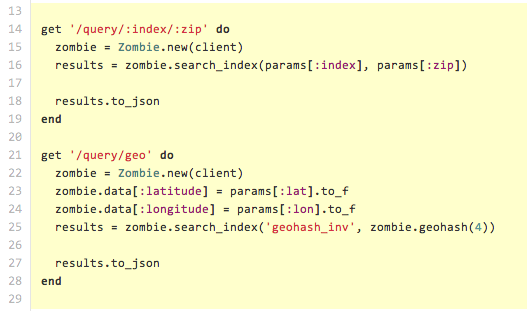
<p>First we&rsquo;ll create small Sinatra application with the two endpoints required to search for zip code and latitude/longitude:</p>

<p><img src="images/server.rb_endpoints.png" alt="image" /></p>

<p><a href="https://github.com/drewkerrigan/riak-inverted-index-demo/blob/master/server.rb#L13-L29">server.rb endpoints</a></p>

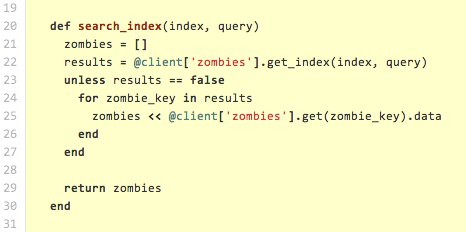
<p>Our zombie model does the work to retrieve the indexes and build the result set:</p>

<p><img src="images/zombie.rb_search_index.png" alt="image" /></p>

<p><a href="https://github.com/drewkerrigan/riak-inverted-index-demo/blob/master/models/zombie.rb#L19-L31">zombie.rb search index</a></p>

<h3>Saving the world, one UI at a time</h3>

<p>Everything wired up with a basic HTML and JavaScript application:</p>

<p><img src="images/ZombieSearch.png" alt="image" /></p>

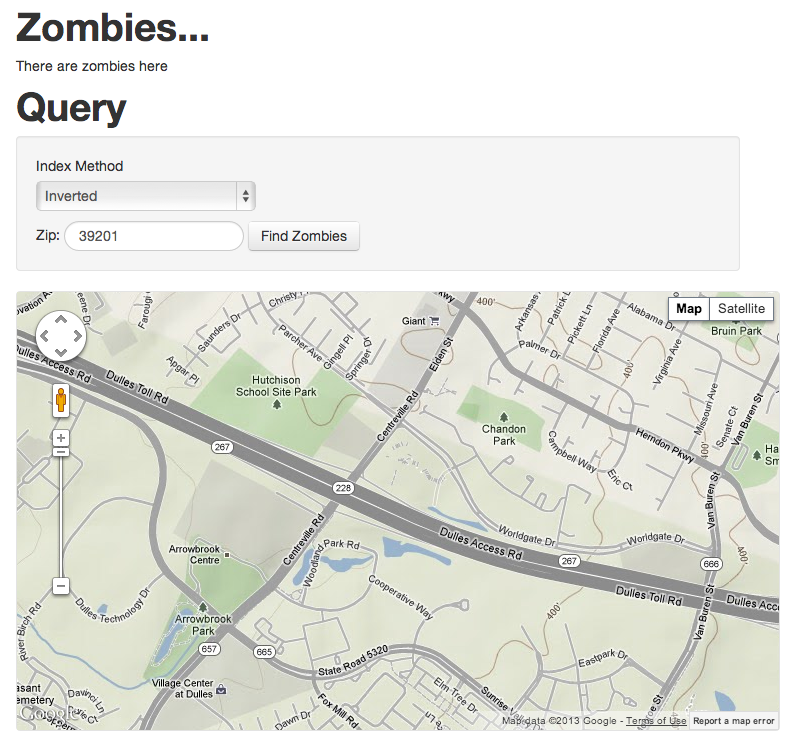
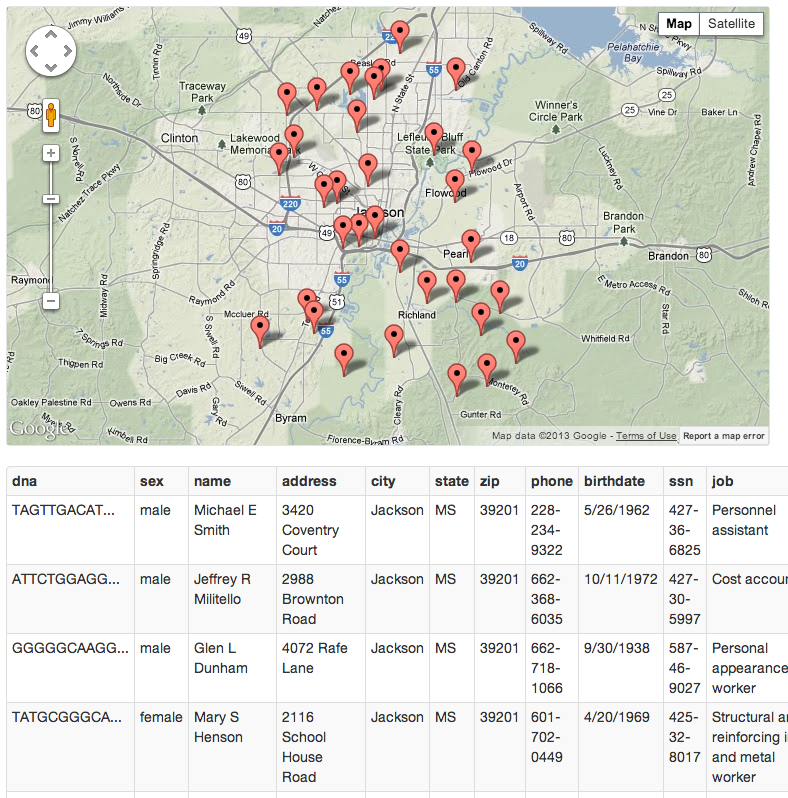
<p>Searching for Zombies in the Zip Code 39201 yields the following:</p>

<p><img src="images/ZombieZipResults.png" alt="image" /></p>

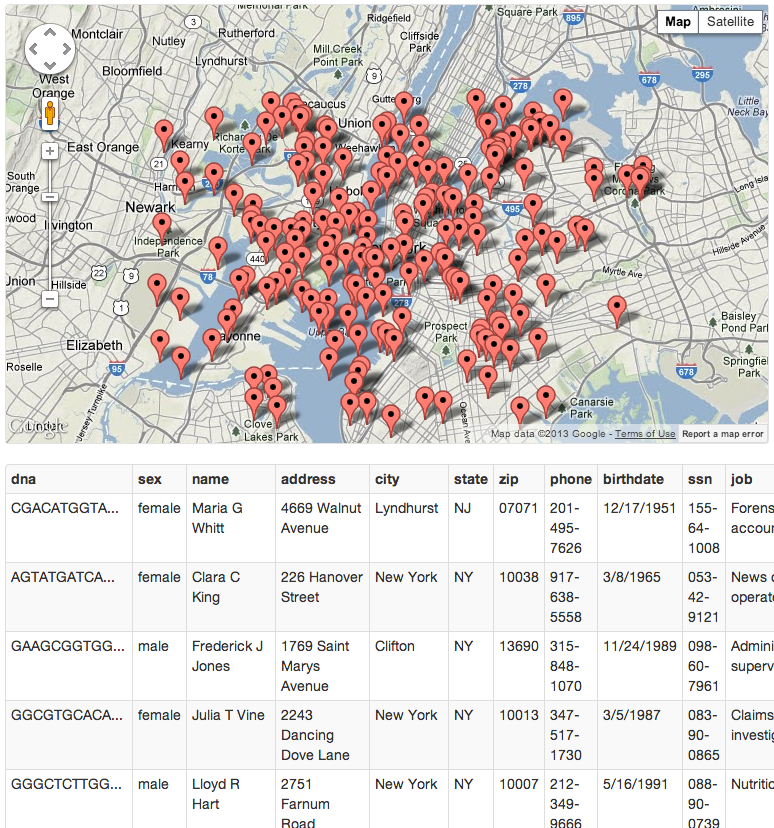
<p>Clicking on Downtown New York confirms your fears and suspicions:</p>

<p><img src="images/ZombieGeohashResults.png" alt="image" /></p>

<p>The geographic bounding inherent to GeoHashes is obvious in a point-dense area so in this case it would be best to query the adjacent GeoHashes.</p>

<h3>Keep fighting the good fight!</h3>

<p>There is plenty left to do in our battle against Zombies!</p>

<ul>
<li>Zombie Sighting Report System so the concentration of live zombies in an area can quickly be determined based on the count and last report date.</li>
<li>Add a crowdsourced Inanimate Zombie Reporting System so that members of the non-zombie population can report inanimate zombies. Incorporate Baysian filtering to prevent false reporting by zombies. They kind of just mash on the keyboard so this shouldn&rsquo;t be too difficult.</li>
<li>Add a correlation feature, utilizing Graph CRDTs, so we can find our way back to Patient Zero.</li>
</ul>

]]></content>
    
  </entry>
  
  <entry>
    
    <title type="html"><![CDATA[Index for Fun and for Profit]]></title>
    <link href="http://dan.kerrigan.io/index-for-fun-and-for-profit/"/>
    
    <updated>2013-12-31T12:51:53-05:00</updated>
    <id>http://dan.kerrigan.io/index-for-fun-and-for-profit</id>
    
    <content type="html"><![CDATA[<h1>Index for Fun and for Profit</h1>

<h2>What is an Index?</h2>

<p>In Riak, the fastest way to access your data is by its key.</p>

<p>However, it&rsquo;s often useful to be able to locate objects by some other value, such as a named collection of users. Let&rsquo;s say that we have a user object stored under its username as the key (e.g., <code>thevegan3000</code>) and that this particular user is in the <code>Administrators</code> group.  If you wanted to be able to find all users such as <code>thevegan3000</code> who are in the <code>Administrators</code> group, then you would add an index (let&rsquo;s say, <code>user_group</code>) and set it to <code>administrator</code> for those users.  Riak has a super-easy-to-use option called <a href="http://docs.basho.com/riak/latest/dev/using/2i/">Secondary Indexes</a> that allows you to do exactly this and it&rsquo;s available when you use either the LevelDB or Memory backends.</p>

<h2>Using Secondary Indexes</h2>

<p>Secondary Indexes are available in the Riak APIs and all of the official Riak clients. Note that <code>user_group</code> becomes <code>user_group_bin</code> when accessing the API because we&rsquo;re storing a binary value (in most cases, a string).</p>

<h3>Add and retrieve an index in the Ruby Client:</h3>

<pre><code>user_object = ruby_client['users'].get_or_new('thevegan3000')
user_object.indexes['user_group_bin'] &lt;&lt; 'administrator'
user_object.store

admin_user_keys = ruby_client['users'].get_index('user_group_bin', 'administrator')
</code></pre>

<h3>In the Python Client:</h3>

<pre><code>user_object = python_client.bucket('users').get('thevegan3000)
user_object.add_index('user_group_bin', 'administrator')
user_object.store()

admin_user_links = python_client.index('users', 'user_group_bin', 'administrator')
</code></pre>

<h3>In the Java Client:</h3>

<pre><code>Bucket userBucket = riakClient.fetchBucket("users").execute();
IRiakObject userObject = userBucket.fetch("thevegan3000").execute();
userObject.addIndex("user_group_bin", "administrator");
userBucket.store(userObject).execute();

BinIndex binIndex = BinIndex.named("user_group_bin");
BinValueQuery indexQuery = new BinValueQuery(binIndex, "users", "administrator");
List&lt;String&gt; adminUserKeys = riakClient.fetchIndex(indexQuery);
</code></pre>

<h2>More Example Use Cases</h2>

<p>Not only are indexes easy to use, they&rsquo;re extremely useful:</p>

<ul>
<li>Reference all orders belonging to a customer</li>
<li>Save the users who liked something or the things that a user liked</li>
<li>Tag content in a Content Management System (CMS)</li>
<li>Store a GeoHash of a specific length for fast geographic lookup/filtering without expensive Geospatial operations</li>
<li>Time-series data where all observations collected within a time-frame are referenced in a particular index</li>
</ul>


<h2>What If I Can&rsquo;t Use Secondary Indexes?</h2>

<p>Indexing is great, but if you want to use the Bitcask backend or if Secondary Indexes aren&rsquo;t performant enough, there are alternatives.</p>

<p>A G-Set Term-Based Inverted Index has the following benefits over a Secondary Index:</p>

<ul>
<li>Better read performance at the sacrifice of some write performance</li>
<li>Less resource intensive for the Riak cluster</li>
<li>Excellent resistance to cluster partition since CRDTs have defined sibling merge behavior</li>
<li>Can be implemented on any Riak backend including <a href="http://docs.basho.com/riak/latest/ops/advanced/backends/bitcask/">Bitcask</a>, <a href="http://docs.basho.com/riak/latest/ops/advanced/backends/memory/">Memory</a>, and of course <a href="http://docs.basho.com/riak/latest/ops/advanced/backends/leveldb/">LevelDB</a></li>
<li>Tunable via read and write parameters to improve performance</li>
<li>Ideal when the exact index term is known</li>
</ul>


<h3>Implementation of a G-Set Term-Based Inverted Index</h3>

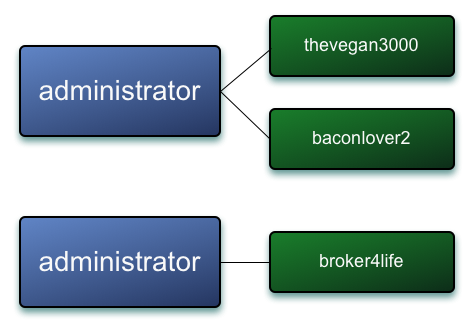
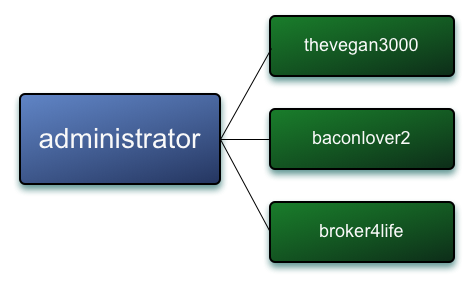
<p>A G-Set CRDT (Grow Only Set Convergent/Commutative Replicated Data Type) is a thin abstraction on the Set data type (available in most language standard libraries). It has a defined method for merging conflicting values (i.e. Riak siblings), namely a union of the two underlying Sets.  In Riak, the G-Set becomes the value that we store in our Riak cluster in a bucket, and it holds a collection of keys to the objects we&rsquo;re indexing (such as <code>thevegan3000</code>).  The key that references this G-Set is the term that we&rsquo;re indexing, <code>administrator</code>.  The bucket containing the serialized G-Sets accepts Riak siblings (potentially conflicting values) which are resolved when the index is read.  Resolving the indexes involves merging the sibling G-Sets which means that keys cannot be removed from this index, hence the name: &ldquo;Grow Only&rdquo;.</p>

<h4><code>administrator</code> G-Set Values prior to merging, represented by sibling values in Riak</h4>

<p><img src="images/unmerged_gsets.png" alt="image" /></p>

<h4><code>administrator</code> G-Set Value post merge, represented by a resolved value in Riak</h4>

<p><img src="images/merged_gsets.png" alt="image" /></p>

<h3>Great! Show me the code!</h3>

<p>As a demonstration, we integrated this logic into a branch of the <a href="https://github.com/basho/riak-ruby-client/tree/broker-inverted-index">Riak Ruby Client</a>.  As mentioned before, since a G-Set is actually a very simple construct and Riak siblings are perfect to support the convergent properties of CRDTs, the implementation of a G-Set Term-Based Inverted Index is nearly trivial.</p>

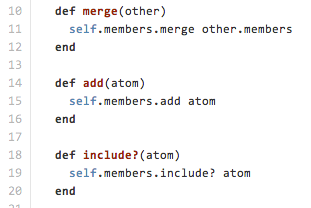
<p>There&rsquo;s a basic interface that belongs to a Grow Only Set in addition to some basic JSON serialization facilities (not shown):</p>

<p><img src="images/gset.rb_interface.png" alt="image" /></p>

<p><a href="https://github.com/basho/riak-ruby-client/blob/broker-inverted-index/lib/riak/crdt/gset.rb#L9-L21">gset.rb interface</a></p>

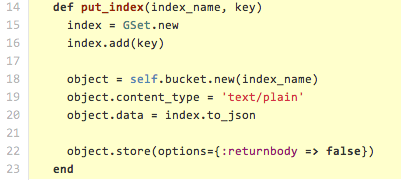
<p>Next there&rsquo;s the actual implementation of the Inverted Index.  The index put operation simply creates a serialized G-Set with the single index value into Riak, likely creating a sibling in the process.</p>

<p><img src="images/inverted_index.rb_put.png" alt="image" /></p>

<p><a href="https://github.com/basho/riak-ruby-client/blob/broker-inverted-index/lib/riak/index/inverted_index.rb#L14-23">inverted_index.rb put index term</a></p>

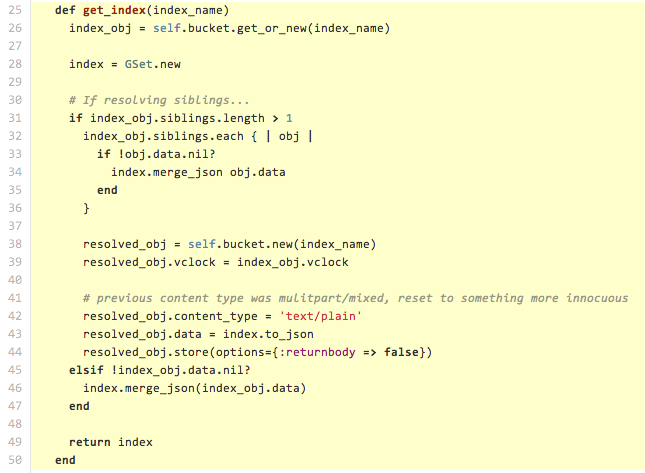
<p>The index get operation retrieves the index value.  If there are siblings, it resolves them by merging the underlying G-Sets, as described above, and writes the resolved record back into Riak.</p>

<p><img src="images/inverted_index.rb_get.png" alt="image" /></p>

<p><a href="https://github.com/basho/riak-ruby-client/blob/broker-inverted-index/lib/riak/index/inverted_index.rb#L25-L50">inverted_index.rb get index term</a></p>

<p>With the modified Ruby client, adding a Term-Based Inverted Index is just as easy as a Secondary Index. Instead of using <code>_bin</code> to indicate a string index and we&rsquo;ll use <code>_inv</code> for our Term-Based Inverted Index.</p>

<p>Binary Secondary Index: <code>zombie.indexes['zip_bin'] &lt;&lt; data['ZipCode']</code></p>

<p>Term-Based Inverted Index: <code>zombie.indexes['zip_inv'] &lt;&lt; data['ZipCode']</code></p>

<h3>The downsides of G-Set Term-Based Inverted Indexes versus Secondary Indexes</h3>

<ul>
<li>There is no way to remove keys from an index</li>
<li>Storing a key/value pair with a Riak Secondary index takes about half the time as putting an object with a G-Set Term-Based Inverted Index because the G-Set index involves an additional Riak put operation for each index being added</li>
<li>The Riak object which the index refers to has no knowledge of which indexes have been applied to it

<ul>
<li>It is possible, however, to update the metadata for the Riak object when adding its key to the G-Set</li>
</ul>
</li>
<li>There is no option for searching on a range of values (e.g., all <code>user_group</code> values from <code>administrators</code> to <code>managers</code>)</li>
</ul>


<p>See the <a href="http://docs.basho.com/riak/latest/tutorials/querying/Secondary-Indexes/">Secondary Index documentation</a> for more details.</p>

<h3>The downsides of G-Set Term-Based Inverted Indexes versus Riak Search:</h3>

<p>Riak Search is an alternative mechanism for searching for content when you don&rsquo;t know which keys you want.</p>

<ul>
<li>No advanced searching: wildcards, boolean queries, range queries, grouping, etc</li>
</ul>


<p>See the <a href="http://docs.basho.com/riak/latest/tutorials/querying/Riak-Search/">Riak Search documentation</a> for more details.</p>

<h2>I&rsquo;m from Missouri, the Show Me state. Let&rsquo;s see some graphs.</h2>

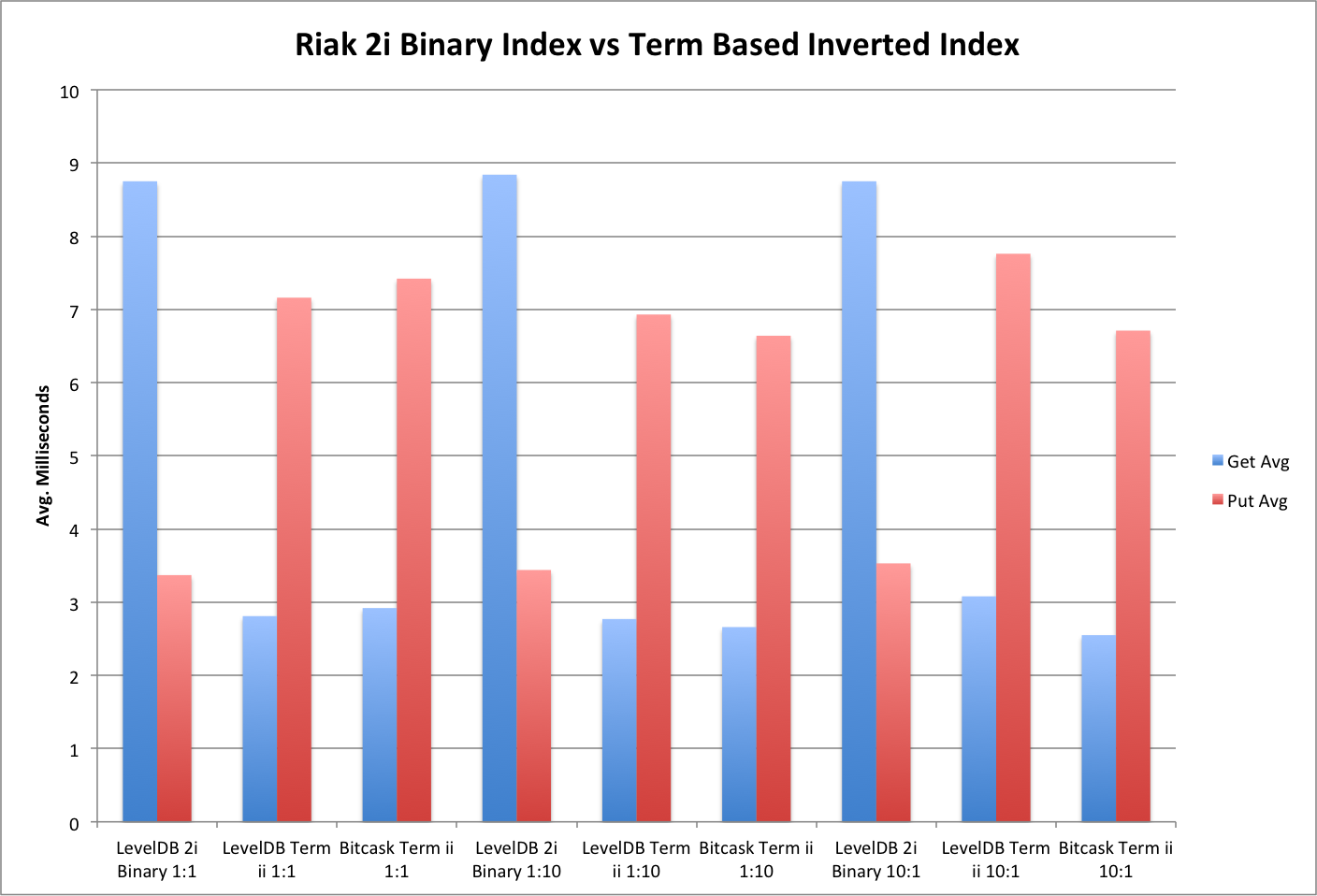
<p>The graph below shows the average time to put an object with a single index and to retrieve a random index from the body of indexes that have already been written.  The times include the client-side merging of index object siblings.  It&rsquo;s clear that although the put times for an object + G-Set Term-Based Inverted Index are roughly double than that of an object with a Secondary Index, the index retrieval times are less than half.  This suggests that secondary indexes would be better for write-heavy loads but the G-Set Term-Based Inverted Indexes are much better where the ratio of reads is greater than the number of writes.</p>

<p><img src="images/BenchMetrics.png" alt="image" /></p>

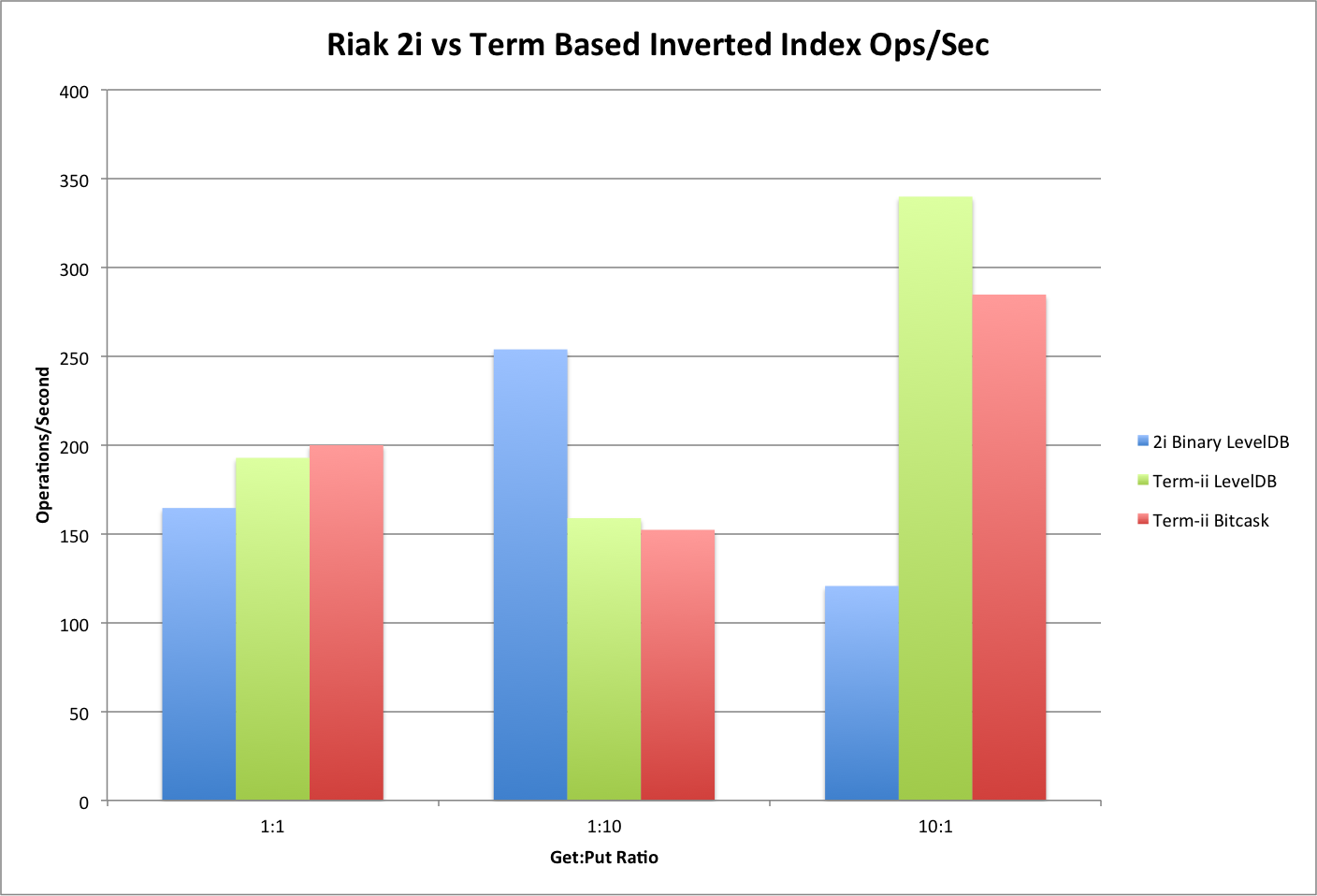
<p>Over the length of the test, it is even clearer that G-Set Term-Based Inverted Indexes offer higher performance than Secondary Indexes when the workload of Riak skews toward reads.  The use of G-Set Term-Based Inverted Indexes is very compelling even when you consider that the index merging is happening on the client-side and could be moved to the server for greater performance.</p>

<p><img src="images/BenchMetricsOpsSec.png" alt="image" /></p>

<h2>Next Steps</h2>

<ul>
<li>Implement other CRDT Sets that support deletion</li>
<li>Implement G-Set Term-Based Indexes as a Riak Core application so merges can run alongside the Riak cluster</li>
<li>Implement strategies for handling large indexes such as term partitioning</li>
</ul>

]]></content>
    
  </entry>
  
</feed>